AOZUMI DB overview
AOZUMI DB is our SQLite-compatible database server, written in Rust and open source. Each database is one SQLite file, served over HTTPS from db.aozumi.dev. Use one from an app on AOZUMI Cloud, or on its own from anywhere.
What it is
- SQLite over HTTPS. The server speaks libSQL's HTTP protocol, so
@libsql/client, Drizzle and plaincurlwork. See Connect from your code. - Asleep when idle. A database nobody is asking is just a file, and a new one is ready almost at once.
- Writes wait their turn. Writes are queued and run in order. Where plain SQLite answers “database is locked”, the next writer waits instead, and reads carry on.
- Standalone or for an app. A database can belong to the workspace, or to one environment of an app. See Databases for your apps.
- One token per database. A token opens one database only, read and write or read only. See Tokens and access.
Get access
AOZUMI DB is invite-only while it is experimental. It uses the same AOZUMI account and workspaces as the Cloud console, so there is no second sign-in.
- Open the consoleGo to db.aozumi.dev/console in the workspace that should get access.
- Ask for itA workspace owner or admin can add a note, “What will you build with it?”, of up to 500 characters, and select Run it. Other members see who to ask.
- Wait for your turnThe AOZUMI team lets workspaces in a few at a time. When yours is in, the page opens on its own.
A workspace has one open request at a time. If a request is declined, an owner or admin can ask again 7 days later. The console's Settings page shows where your request stands.
Quick start
Create a standalone database and query it from your machine. You need to be a workspace owner or admin.
- Create the databaseOn Databases, select New database, choose Standalone, type a name such as
notesand select Create database. Names use lowercase letters, numbers and hyphens, up to 40 characters, and start and end with a letter or number. The console opens the new database. - Show a tokenOn the database's page, keep Read and write selected and select Show token. Copy the two lines into your project's
.envfile, and keep that file out of Git. - Install a clientRun
npm install @libsql/client, or use Drizzle. - Query itCreate a table on the console's SQL page, or let your code create it.
AOZUMI_DB_URL=https://db.aozumi.dev
AOZUMI_DB_TOKEN=adb1.…
import { createClient } from "@libsql/client";

const db = createClient({
  url: process.env.AOZUMI_DB_URL!,
  authToken: process.env.AOZUMI_DB_TOKEN,
});

const { rows } = await db.execute("select * from notes");
Every database uses the same URL. The token says which database it opens.
The console
The AOZUMI DB console has three pages in its sidebar, plus one page per database.
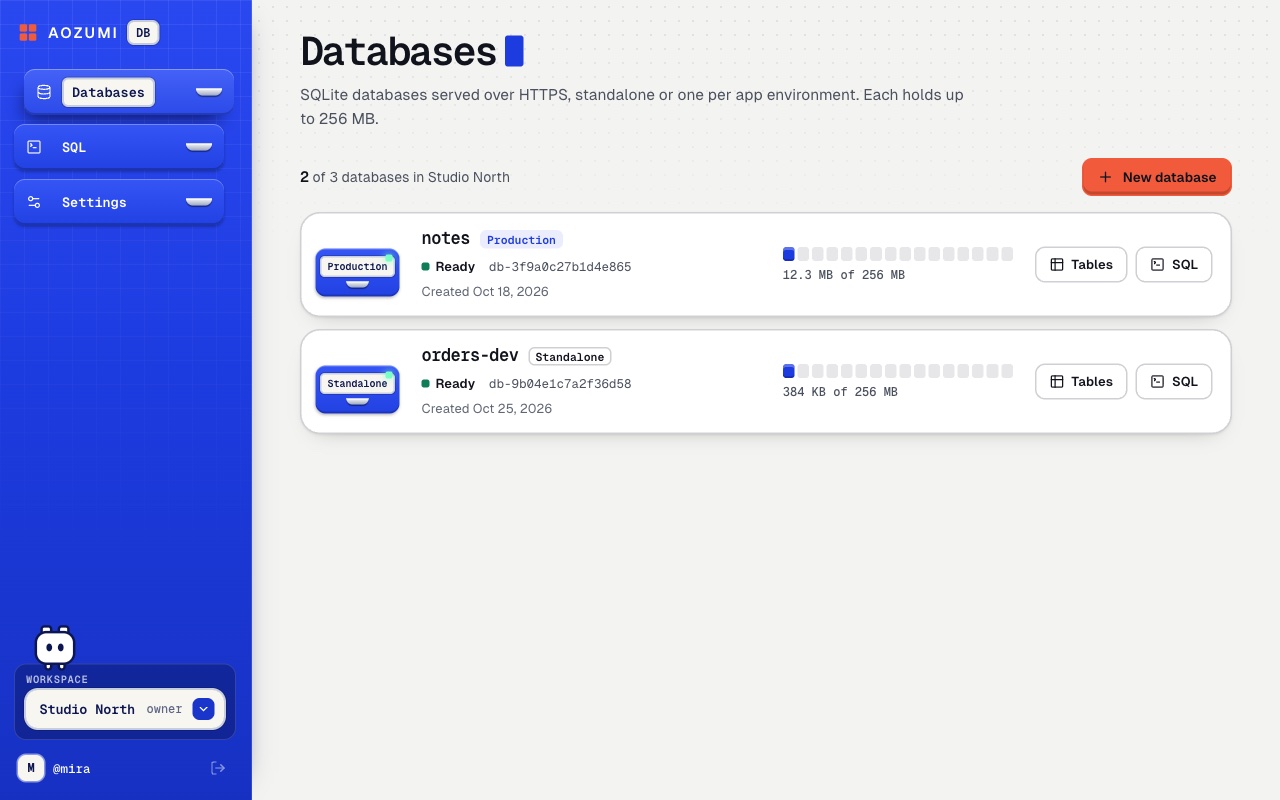
- Databases
- Every database in the workspace, with its app and environment or Standalone, its status, its size against 256 MB, and when it was created. New database creates one.
- SQL
- An editor with the tables and their columns beside it, snippets, and the queries you ran in this browser.
- Settings
- Your role, your workspace's access, the server URL, how to connect, and the limits.
- A database
- Its tables, 50 rows a page; how it connects; for a standalone database, Hand to an app; and Delete database.
Run SQL
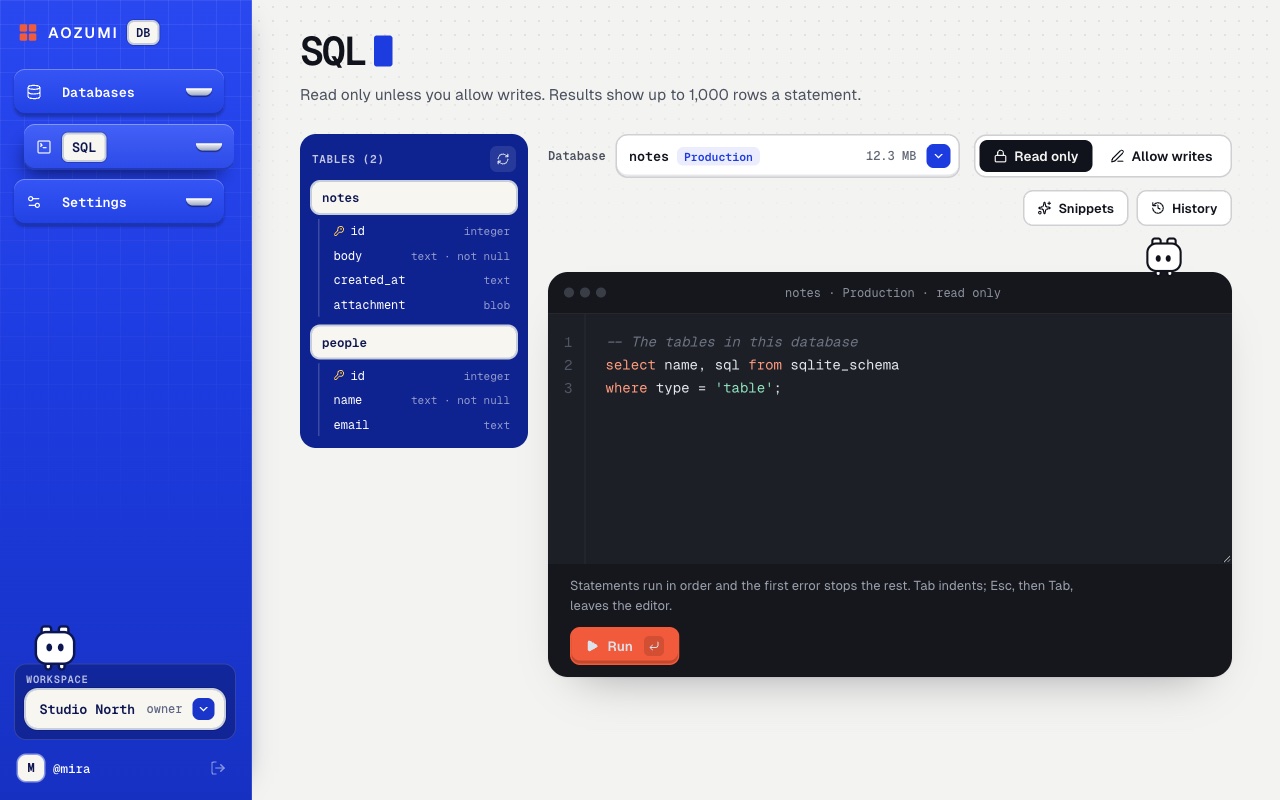
The SQL page runs against the database chosen in its Database picker.
- Press ⌘ ↵ (or Ctrl ↵) to run. If you select part of the script, only that part runs.
- Statements run in order, and the first error stops the rest. A transaction left open is rolled back.
- Results show as a table you can copy or download as CSV. At most 1,000 rows are kept per statement, and 4 MB per run.
- The page is Read only until an owner or admin turns on Allow writes. With writes on, a script that drops a table, index, view, trigger or column, or that deletes or updates every row, asks first: This destroys data, then Run it anyway.
- Runs with writes go in the workspace audit log, without the SQL text.
Who can do what
Roles come from your workspace; see Workspaces and members.
| Action | Every member | Owners and admins |
|---|---|---|
| See databases, browse tables, run read-only SQL | Yes | Yes |
| Run SQL that writes | No | Yes |
| Create and delete databases | No | Yes |
| Show and rotate a standalone database's token | No | Yes |
| Hand a database to an app, or take it back | No | Yes |
| Ask for access | No | Yes |
AOZUMI DB or Postgres?
An app on AOZUMI Cloud can also get Managed Postgres. They suit different jobs.
| AOZUMI DB | Managed Postgres | |
|---|---|---|
| Database | SQLite, over HTTPS | Postgres 17, over TLS |
| Your app gets | AOZUMI_DB_URL and AOZUMI_DB_TOKEN | DATABASE_URL |
| Clients | @libsql/client, Drizzle, HTTP | pg or any Postgres client or ORM |
| Without an app | Yes, as a standalone database | No, it belongs to an app |
| Backups and restore | Not yet | Scheduled backups and point-in-time restore |
| Size | 256 MB each, 3 per workspace | See Limits |
Pick Postgres for data you cannot lose today. Pick AOZUMI DB for small apps, prototypes and tools that sit idle most of the time, or when you want a database before you have an app.
Questions
- Is AOZUMI DB SQLite?
- Yes. Each database is one SQLite file on AOZUMI's own database server, written in Rust. Your code reaches it over HTTPS with a libSQL client such as @libsql/client or Drizzle, so the SQL you write is SQLite's.
- Can I use AOZUMI DB without an app on AOZUMI Cloud?
- Yes. A standalone database belongs to your workspace, not to an app. Connect from your laptop, a script or another host with its URL and a token.
- Are my databases backed up?
- Not yet. While AOZUMI DB is experimental there are no backups you can restore, and deleting a database cannot be undone. Keep your own copy of anything you cannot lose.
- Who can use it?
- AOZUMI DB is experimental and invite-only. A workspace owner or admin asks for access in the AOZUMI DB console, and the AOZUMI team lets workspaces in a few at a time.
Checked against the product on .